RGB Gaming Mouse for FPS Games: What Really Matters for Better Aim
You open a new tab. You type something like “best RGB gaming mouse for FPS games.” And suddenly, you are hit with a wall of numbers, brand names, and tech words that feel like a foreign language.
DPI. Polling rate. Optical sensor. Lift-off distance. What does any of this even mean?
And then there is the big question nobody seems to answer directly: does all that glowing RGB light really help you get better at FPS games?
This guide will answer all of that. No fluff. No confusing tech talk. Just clear, no-nonsense information that helps you pick the right mouse and start winning more games.
What Is an RGB Gaming Mouse?
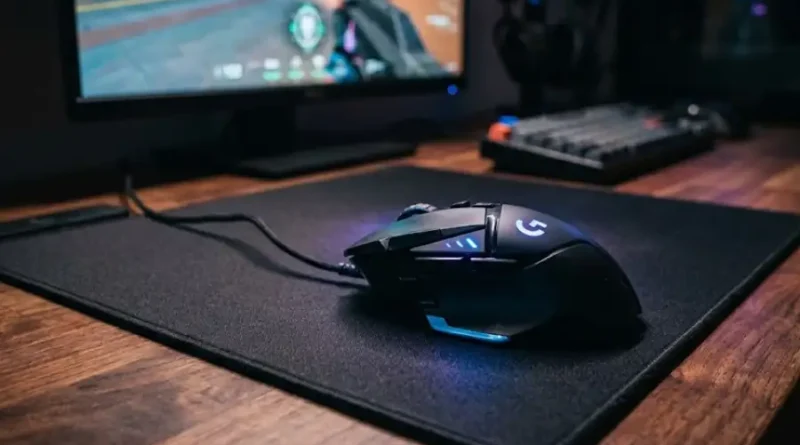
RGB stands for Red, Green, and Blue. These are the three colors of light that mix together to create millions of color combinations. An RGB gaming mouse has LED lights built into it. These lights glow and cycle through colors. You can usually control the color and pattern through software on your computer.
That is really all RGB means. It is a lighting feature. It makes your mouse look cool on your desk.
But here is where most beginners get confused. They think that because a mouse glows and looks high-tech, it must also perform better. That is not always true. And in some cases, it can sometimes work against you.
More on that in a moment.
Does RGB Really Help You Play Better in FPS Games?
Short answer: no, the lights themselves do not make you a better player.
RGB lighting is a cosmetic feature. It has zero effect on how accurately the mouse tracks your movements. It does not improve your aim. It does not reduce your reaction time. It will not help you land that headshot you keep missing.
What RGB does do is make your setup look amazing. It can also serve a useful purpose. Some mice let you set different colors for different DPI settings. So when you switch from low sensitivity to high sensitivity, the color changes to remind you. That is a real help in FPS games where you might want one DPI for general play and another for sniping.
But as a performance tool? The light is just for looks.
Now here is what really matters. The things inside the mouse that you cannot see are what decide whether you win or lose.
The Specs That Really Matter for FPS Games
1. The Sensor: The Heart of Your Mouse
The sensor is the most important part of any FPS mouse. It is the small chip at the bottom that tracks every tiny movement you make.
In FPS games, you need a sensor that is fast, accurate, and smooth. A bad sensor will cause your crosshair to jump or skip, especially during fast movements. This is called jitter or spinning out, and it will ruin your aim at the worst moments.
Look for an optical sensor from PixArt. Models like the PixArt 3395 or 3950 are used in many top gaming mice and are trusted by competitive players. Avoid laser sensors for FPS games. They tend to add a tiny amount of inconsistency that you do not want in fast shooters.
A good sensor is worth more than any amount of RGB lighting.
2. Mouse Weight: Lighter Is Better for FPS
This one surprises a lot of new players. The weight of your mouse has a huge effect on how you aim.
FPS games demand fast, sharp movements. You need to flick your mouse quickly to snap onto a moving target. A heavy mouse slows you down. Your wrist gets tired faster too, especially during long sessions.
Most professional FPS players use mice that weigh between 45 and 65 grams. If your mouse weighs more than 90 grams, you will feel it during a two-hour ranked session.
Here is the connection to RGB that nobody talks about. RGB lighting requires LED hardware inside the mouse. That hardware adds weight. Some heavily lit mice with multiple RGB zones weigh significantly more than their non-RGB versions. So if you want RGB on an FPS mouse, look for one that keeps the weight under 70 grams even with the lighting hardware included.
3. DPI: You Do Not Need to Max It Out
DPI stands for Dots Per Inch. It measures how sensitive your mouse is to movement. A higher DPI means your cursor moves further on screen for the same physical mouse movement.
Gaming mice are advertised with DPI numbers like 25,000 or even 30,000. These numbers are mostly marketing. Almost no serious FPS player uses anything above 1,600 DPI. Most pro players in games like Valorant and Counter-Strike 2 use between 400 and 800 DPI.
Low DPI forces you to use bigger arm movements. That gives you more control and better accuracy for precise shots. High DPI makes your cursor fly across the screen from even the smallest hand twitch. That feels fast, but it is almost impossible to be consistently accurate.
A good rule of thumb: start at 800 DPI and adjust from there based on how it feels in your game of choice.
4. Polling Rate: How Often the Mouse Talks to Your PC
Polling rate is measured in Hz. It tells you how many times per second your mouse sends its position data to your computer.
A mouse with a 1000 Hz polling rate sends 1,000 updates every second. That means your cursor position is refreshed every single millisecond. That is fast enough for almost any FPS player.
Some newer mice advertise 4000 Hz or even 8000 Hz. These can offer slightly smoother input, but they also put more load on your CPU. On older computers, running 8000 Hz can cause noticeable performance drops in-game. For most players, 1000 Hz is the sweet spot and all you truly need.
5. Grip Style: The Feature Nobody Mentions Enough
Your grip style is how you naturally hold a mouse. There are three main types, and choosing a mouse that matches your grip is just as important as any spec on the box.
Palm Grip: Your whole hand rests flat on the mouse. This is comfortable for long sessions. You want a larger, more curved mouse for this grip.
Claw Grip: Your palm touches the back of the mouse but your fingers arch upward, like a claw. This gives fast clicks and is great for FPS games. A medium-sized mouse works well here.
Fingertip Grip: Only your fingertips touch the mouse. No palm contact at all. This allows very quick, precise movements. You want a smaller, lighter mouse for this style.
Most FPS professionals use claw or fingertip grip because both allow fast, reactive movements. If you are not sure which grip you use, pick up your mouse right now without thinking about it. However it lands in your hand naturally, that is your grip style.
The Hidden Trade-Off: RGB vs. FPS Performance
Here is something most buying guides skip over completely.
RGB lighting has a direct trade-off with two things that matter in FPS games: weight and battery life.
If you use a wireless RGB mouse, those LEDs drain your battery faster. A wireless gaming mouse without RGB might last 70 to 100 hours on a single charge. The same mouse with full RGB running at maximum brightness might last 20 to 30 hours. That means more charging interruptions during gaming sessions.
Additionally, because LED hardware adds small amounts of weight, some ultra-light competitive mice skip RGB entirely. The Logitech G Pro X Superlight series, for example, has no RGB. That is a deliberate choice to keep the weight as low as possible.
This is why many pro players turn RGB off entirely. It saves battery and keeps their setup distraction-free. Some even say a dark, clean setup helps them focus better during competitive matches.
None of this means you should avoid RGB. It means you should go in with open eyes. If having a glowing setup brings you joy and motivates you to play, that is completely valid. Just do not expect the lights to improve your kill-death ratio.
Wired vs. Wireless RGB Mouse for FPS
A few years ago, the answer was simple: always use wired for competitive play. Wireless technology was not fast enough and introduced tiny delays called latency.
Today, that has changed completely. Modern wireless gaming mice using 2.4 GHz USB receivers have latency that is nearly identical to wired mice. Brands like Logitech, Razer, and SteelSeries have all solved this problem.
For FPS games in 2025, either wired or wireless is fine. The choice comes down to your personal setup and budget. Here are the key points to keep in mind.
- Wired mice never need charging. They are usually cheaper too.
- Wireless mice give you cleaner desk space and free movement.
- If you go wireless and want RGB, budget for more frequent charging.
- Always use the 2.4 GHz dongle for gaming, not Bluetooth. Bluetooth adds noticeable lag.
Top RGB Gaming Mice Worth Looking At for FPS
Rather than listing 15 mice and overwhelming you, here are a few trusted options across different budgets. These are well-tested by the gaming community and strike a good balance between RGB looks and FPS performance.
Razer DeathAdder V3 HyperSpeed
This is a great starting point for beginners. It uses a reliable optical sensor, weighs around 75 grams, and includes Razer’s Chroma RGB system. The ergonomic right-handed shape is comfortable for palm and claw grip users. It is also wireless, which keeps your desk clean.
Logitech G502 X Plus
If you want a mouse that can handle FPS games and still looks incredible on your desk, this is a strong pick. It has an eight-zone RGB light strip, a powerful HERO sensor, and hybrid optical-mechanical switches. It is on the heavier side at around 106 grams, so it is better for casual FPS play rather than ultra-competitive ranked matches.
SteelSeries Rival 3
This is one of the best budget-friendly options on the market. It has a solid optical sensor, RGB lighting, and weighs just 77 grams. If you are just starting out and do not want to spend a lot, this mouse delivers strong FPS performance at a low price.
Razer Basilisk V3 Pro
For those who want the full package, this wireless mouse brings together a high-end optical sensor, multiple RGB zones, and excellent ergonomics. It is heavier than a pure competitive FPS mouse, but for most players who want both style and solid performance, it is hard to beat.
How to Set Up Your RGB Gaming Mouse for FPS Games
Buying the right mouse is only half the job. Setting it up correctly can make a big difference in how it feels to play.
- Install the official software. Logitech G HUB, Razer Synapse, and SteelSeries GG are the main ones. This lets you control DPI, RGB, and button assignments.
- Turn off mouse acceleration. Go to your Windows mouse settings and make sure Enhance Pointer Precision is turned off. This setting adds inconsistent speed to your cursor and will hurt your aim.
- Set your DPI. Start at 800 DPI and play for a week. If everything feels too slow, nudge it up slightly. If your aim feels jumpy and out of control, drop it lower.
- Set polling rate to 1000 Hz. This is the standard setting and works great on almost every modern PC.
- Assign your RGB colors for DPI profiles. This is optional but useful. Assign a color to each DPI level so you always know what sensitivity you are on without looking at any software.
- Use a good mouse pad. This is not part of the mouse itself, but a smooth, large mouse pad makes a huge difference for consistent tracking in FPS games.
Frequently Asked Questions
Does RGB lighting slow down a gaming mouse?
No, RGB lighting does not slow down a wired gaming mouse. On wireless mice, running full RGB brightness drains the battery faster and can reduce total playtime between charges. It does not add any input delay.
What DPI should I use for FPS games?
Most FPS players perform best between 400 and 1600 DPI. Starting at 800 DPI is a safe choice for beginners. Avoid using extremely high DPI settings like 6,000 or above. They feel fast but make precise aiming very difficult.
Is a wired or wireless RGB mouse better for FPS?
Both work well for FPS games today. Modern 2.4 GHz wireless mice have almost zero input lag. Wired mice cost less and never need charging. The choice is mostly about personal preference and budget.
Do pro FPS players use RGB mice?
Some do and some do not. Many professionals turn RGB off completely during competitive matches to save battery life on wireless mice and to reduce visual distraction. Their choice of mouse is based entirely on weight, shape, and sensor quality, not lighting.
How much should I spend on an RGB gaming mouse for FPS?
You do not need to spend a lot to get a good FPS mouse. A budget between $30 and $60 can get you a mouse with a great sensor and RGB lighting that handles competitive play well. Spending more mostly gets you wireless connectivity, lighter weight, and premium switches.
Does mouse weight matter in FPS games?
Yes. Lighter mice let you make faster flick shots and reduce wrist fatigue during long sessions. Most competitive FPS players prefer mice between 45 and 70 grams. Anything above 90 grams can feel slow during fast-paced matches.
The Bottom Line
An RGB gaming mouse for FPS games can absolutely be a great investment. The lights look amazing, they add personality to your setup, and they can even serve a real purpose when tied to your DPI settings.
But here is what you need to remember: the glow is just decoration. What wins games is the sensor quality, the weight of the mouse, your DPI setting, and most importantly, how well the shape fits your hand and grip style.
Pick a mouse that feels natural in your hand. Set your DPI low enough to aim precisely. Keep your polling rate at 1000 Hz. Turn off mouse acceleration. Practice consistently.
Do all of that and it genuinely does not matter whether your mouse glows pink, green, or not at all. Your aim will improve and your games will feel better.
Now close this tab and go play.