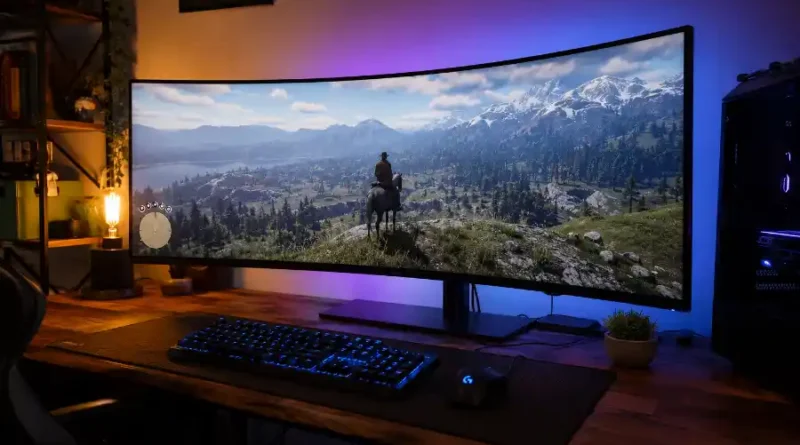
Ultrawide Monitor for Immersive Gaming: What to Buy, What to Skip, and Why It Changes Everything
You sit down to play your favorite open-world game. The city stretches out in front of you. The mountains are on your left. The ocean is on your right. And the entire scene wraps around you like you are genuinely standing inside it.
That is what gaming on an ultrawide monitor feels like.
If you have been thinking about upgrading your setup, you have probably come across the term “ultrawide monitor” quite a few times. But with so many options out there, it can feel overwhelming. What size do you need? What specs really matter? Is it worth the money?
This article answers all of that. By the end, you will know what to look for and whether an ultrawide monitor is the right choice for you.
What Is an Ultrawide Monitor?
A regular gaming monitor has a 16:9 aspect ratio. That is the standard shape you see on most TVs and computer screens today. An ultrawide monitor is wider than that. It uses a 21:9 aspect ratio, which means the screen is much wider from left to right.
Think of it this way: a normal monitor shows you a window. An ultrawide monitor shows you a panorama.
There is also something called a super ultrawide monitor. These use a 32:9 aspect ratio, which is basically two regular monitors side by side, but without the ugly gap in the middle. These are massive, often 49 inches wide, and they are built for people who want the most immersive experience possible.
For most gamers, the sweet spot is a 34-inch ultrawide with a 3440×1440 resolution and a 21:9 aspect ratio. It gives you a lot of extra screen space without being too big or too hard on your graphics card.
Why Gamers Love Ultrawide Monitors
The biggest reason gamers switch to ultrawide is the field of view. When you play a game on an ultrawide screen, you can see more of the world around you. In a racing game, you see more of the track curving ahead. In an open-world RPG, the landscape feels alive and massive. In a flight simulator, the cockpit wraps around you in a way that feels real.
It goes beyond seeing more. It is about feeling more present in the game.
Here are the main reasons gamers choose ultrawide monitors:
- Bigger field of view: You see more of the game world without moving the camera. This makes exploration and storytelling games feel cinematic.
- Better immersion: The wider screen pulls your peripheral vision into the game. Your brain naturally feels more engaged.
- No bezel gap: Unlike using two monitors side by side, an ultrawide gives you one clean, uninterrupted display.
- Great for multitasking: Streamers can keep their chat on one side while gaming on the other. No second monitor needed.
- Cinematic movies: Many films are shot in a 21:9 ratio. On a regular monitor, you see black bars at the top and bottom. On an ultrawide, those movies fill the entire screen.
The Specs That Really Matter Before You Buy
Not all ultrawide monitors are created equal. Here are the specs you need to pay attention to before buying.
Resolution
For a 34-inch ultrawide, the standard resolution is 3440×1440. This is also called UWQHD or Ultrawide Quad HD. It gives you a sharp, clear image that looks great up close. If you go with a 49-inch super ultrawide, you will want 5120×1440 to keep the picture looking crisp.
Avoid getting a 34-inch ultrawide with only 2560×1080 resolution. That is too low for the screen size and the image will look soft and blurry.
Refresh Rate
Refresh rate is how many times per second your screen updates the image. A higher number means smoother motion. For gaming, you want at least 144Hz. If you play fast-paced games like shooters or racing games, look for 165Hz or higher. Some premium models now offer 240Hz, which is incredibly smooth.
A 60Hz ultrawide monitor is not worth buying for gaming. The extra screen width will not help you if the motion looks choppy.
Response Time
Response time is how fast a pixel can change color. A slow response time causes motion blur and ghosting, which means fast-moving objects leave a blurry trail on screen. For gaming, aim for 1ms response time. This keeps everything looking sharp, even during intense action.
Panel Type
The type of panel inside the monitor affects color, contrast, and how fast it responds. There are three main types:
- IPS panels have excellent color accuracy and wide viewing angles. They look great from any position and are ideal if you also use your monitor for content creation or media.
- VA panels have deeper blacks and better contrast. They are a solid choice for immersive gaming, especially in dark environments.
- OLED panels are the best of both worlds. They offer perfect blacks, stunning colors, and very fast response times. They are also the most expensive option, but the image quality is hard to beat.
Adaptive Sync (FreeSync and G-Sync)
This is a feature that connects your monitor and your graphics card so they work together smoothly. Without it, you can get screen tearing, where the image looks like it is split into two pieces. With FreeSync (for AMD GPUs) or G-Sync (for Nvidia GPUs), the screen updates at precisely the right time, giving you a perfectly smooth picture. Any ultrawide gaming monitor you buy today should have one of these.
Curve
Most ultrawide gaming monitors are curved. The curve is measured in a number like 1000R, 1500R, or 1800R. A lower number means a tighter, more aggressive curve. A 1000R curve wraps around your field of view more closely, which many gamers find more immersive. A 1500R or 1800R curve is gentler and more comfortable for long sessions.
Which Games Work Best on an Ultrawide?
Ultrawide monitors shine brightest with certain types of games. Open-world RPGs, racing simulators, flight sims, and space exploration games are absolutely stunning in 21:9. Games like these are designed to fill your vision, and an ultrawide does that job well.
Strategy games and city builders also benefit from the extra screen space. You can see more of your map at once, which makes managing large campaigns much easier.
However, not every game works perfectly with an ultrawide. Some competitive shooters like Valorant or CS2 simply lock the aspect ratio to 16:9. This is because developers want all players to have the same field of view, so no one gets an unfair advantage. You may also run into black bars on the sides of the screen in older games or some console ports.
Before buying, it is smart to check whether the games you play most often support ultrawide resolutions natively.
The Real Downsides of Ultrawide Monitors
No guide would be complete without talking about the drawbacks. Here is what most reviews do not tell you upfront.
- Game compatibility is not perfect: Some games still do not fully support ultrawide. Cutscenes in popular titles sometimes play in 16:9 with black bars on the sides, which can break the immersion at key story moments.
- Your GPU will work harder: A 3440×1440 resolution has a lot more pixels than a standard 1080p or 1440p screen. Your graphics card needs to be strong enough to push high frame rates at that resolution. Budget GPUs will struggle.
- Console support is limited: If you game on a PlayStation or Xbox, ultrawide is mostly not supported. Consoles output at 16:9, so you will likely see black bars on the sides of your screen.
- Desk space: A 34-inch ultrawide is significantly wider than a standard monitor. Make sure your desk is wide enough to comfortably hold it and that your seating distance is appropriate.
- Price: Good ultrawide monitors cost more than comparable standard monitors. Budget options start around $200 to $300, but quality gaming ultrawides often start at $400 and go up from there.
How to Choose the Right Ultrawide for Your Needs
Not every gamer needs the same monitor. Here is a simple way to figure out which type is right for you.
If you play single-player, story-driven, or open-world games: Go for a 34-inch ultrawide with a 3440×1440 resolution and at least 144Hz. A curved IPS or OLED panel will give you the best visual experience. This is the most popular and well-rounded choice.
If you play racing sims, space games, or flight simulators: Consider going up to a 49-inch super ultrawide. The extra width wraps around your vision completely and makes simulation games feel astonishingly real.
If you play competitive shooters or esports titles: An ultrawide may not give you a big advantage, and some games may even restrict it. A fast 1440p monitor with 165Hz or higher might serve you better for those games specifically.
If you are on a budget: Look for a 34-inch VA panel ultrawide with 144Hz and 1ms response time. You can find solid options in the $250 to $350 range that still deliver a great experience for the price.
Top Features to Look for in a Summary
- 34-inch screen with 3440×1440 resolution (minimum)
- At least 144Hz refresh rate, preferably 165Hz or higher
- 1ms response time
- FreeSync or G-Sync support
- IPS, VA, or OLED panel depending on your budget
- Curved display for better immersion
- HDMI 2.1 or DisplayPort for clean, high-speed connectivity
Is an Ultrawide Monitor Worth It for Gaming?
If you love losing yourself in game worlds, yes. An ultrawide monitor is one of the biggest upgrades you can make to your gaming experience. The extra width gives you more than extra screen space. It changes how you feel while playing. Games feel more alive. Environments feel bigger. And sitting down to play feels like an event, not a routine.
The idea is to match the monitor to the kinds of games you play. If most of your time goes into open-world adventures, racing games, or immersive RPGs, an ultrawide will genuinely change how you experience those titles.
If you primarily play fast competitive shooters, weigh your options carefully. You might benefit more from a high-refresh 1440p monitor instead.
Either way, knowing what to look for puts you in a much better position to make the right call and avoid buyer’s remorse.
Frequently Asked Questions
What is the best size for an ultrawide gaming monitor?
For most gamers, 34 inches with a 3440×1440 resolution is the best balance of immersion, sharpness, and GPU performance. It is big enough to feel cinematic without being too demanding on your system.
Do all games support ultrawide monitors?
Most modern PC games support 21:9 ultrawide natively. However, some older games, certain competitive titles, and some console ports do not. You may see black bars on the sides of your screen in those cases. Always check a game’s ultrawide compatibility before buying.
Is an ultrawide monitor good for console gaming?
Generally, no. Most consoles like PlayStation and Xbox do not support ultrawide resolutions natively. You will likely end up with black bars on the sides or a stretched image. Ultrawide monitors work best with PC gaming.
Do I need a powerful GPU for an ultrawide monitor?
Yes. A 3440×1440 ultrawide has significantly more pixels than a 1080p or standard 1440p screen. You will need a mid-to-high range GPU to run modern games at high settings and smooth frame rates. Entry-level graphics cards will struggle.
Is OLED worth it for an ultrawide gaming monitor?
If your budget allows it, yes. OLED panels offer perfect black levels, incredible contrast, and extremely fast response times. The visual quality is noticeably better than IPS or VA panels. Just be aware that OLED screens require some extra care to avoid screen burn-in over long periods.
What is the difference between 21:9 and 32:9 ultrawide monitors?
A 21:9 monitor is the standard ultrawide format, typically 34 inches wide. A 32:9 monitor is a super ultrawide, typically 49 inches wide. The 32:9 is equivalent to two regular monitors side by side. It offers extreme immersion but takes up a lot of desk space and requires a very powerful GPU to run well.