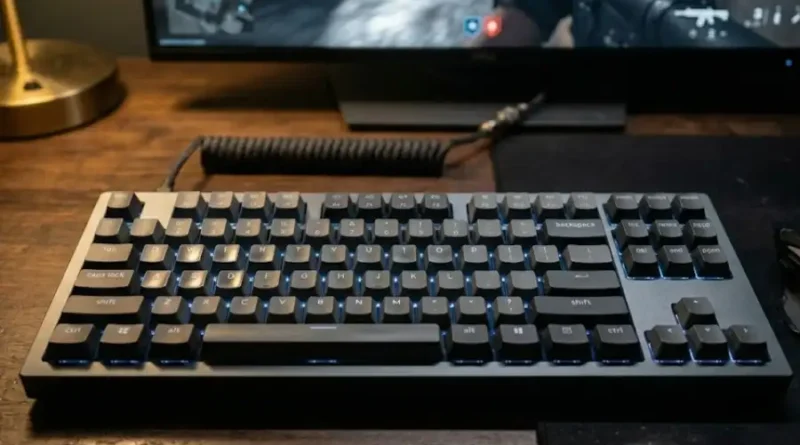
: What ProsMechanical Keyboard for Esports Use and Why It Matters
You just lost a gunfight by a split second. Your aim was good. Your reaction was fast. But your keyboard was slow.
This is something esports players deal with every day. The right keyboard can be the difference between winning and losing at the highest level. And the wrong one can hold you back no matter how skilled you are.
In this guide, you will find out why mechanical keyboards have taken over the esports scene, what features really matter, and how to pick the best one for your game. Whether you are just starting out or trying to climb the ranked ladder, this guide has what you are looking for.
Why Your Keyboard Matters More Than You Think
Most gamers spend a lot of money on a good mouse or a high-refresh-rate monitor. But the keyboard often gets ignored. That is a big mistake.
Every command you send in a game goes through your keyboard first. Strafing, peeking, casting abilities, building structures in Fortnite, counter-strafing in CS2 or Valorant. All of it starts with a keypress. If your keyboard is slow to respond, your character is slow to respond. And in esports, slow means dead.
Professional players know this. That is why nearly every top esports player, from Fortnite pros to Counter-Strike legends, uses a mechanical keyboard. It is not about brand loyalty. It is about real, measurable performance.
Mechanical vs. Membrane: What Is the Actual Difference?
A membrane keyboard uses a soft rubber layer under all the keys. When you press a key, the rubber pushes down and completes a circuit. It feels mushy, and the response is not very precise.
A mechanical keyboard has a separate physical switch under every single key. Each switch has a small spring inside it. When you press a key, the spring compresses and triggers a response at a very specific point. This is called the actuation point.
This is what that means for your game:
- Faster response: Mechanical switches register your keypresses more quickly and more precisely than membrane keys.
- Better durability: High-quality mechanical switches can last 50 to 100 million keypresses. Most membrane keyboards wear out much faster.
- Consistent feel: Every keypress feels the same. You always know when the key registers. This helps you build muscle memory faster.
- No ghosting: Mechanical keyboards with N-key rollover let you press many keys at once and register all of them. Membrane keyboards often miss inputs when multiple keys are pressed together.
Simply put, if you are serious about competitive gaming, a mechanical keyboard is not optional. It is essential.
The Three Types of Switches (And Which One Is Best for Esports)
Not all mechanical switches are the same. There are three main types. Each one feels and performs differently.
Linear Switches
Linear switches move smoothly from top to bottom with no bump or click. They are fast, quiet, and consistent. This is why most esports players prefer them. Popular examples include Cherry MX Red, Gateron Yellow, and SteelSeries OmniPoint switches.
Best for: FPS games like Valorant, CS2, and Apex Legends. Any game where speed and quick repeated keypresses matter.
Tactile Switches
Tactile switches give you a small bump when the key activates. You can feel right when the keypress registers. This is great for players who want feedback without noise. Popular examples include Cherry MX Brown and Topre switches.
Best for: MOBA games like League of Legends, strategy games, or players who also do a lot of typing.
Clicky Switches
Clicky switches make a loud click sound with every press. They feel satisfying but they are very noisy. Most competitive esports players avoid them during tournaments or team environments. Popular examples include Cherry MX Blue and Razer Green switches.
Best for: Casual gaming or players who love the classic keyboard click and game alone.
Quick Tip: For esports, go with linear switches. They are the most popular choice among professionals for a reason. Less resistance means faster inputs, and faster inputs mean better performance.
What Is Rapid Trigger (And Why It Makes Such a Big Difference)
This is one of the most important features in modern esports keyboards. And most people have never heard of it.
On a regular mechanical keyboard, every key has a fixed actuation point and a fixed reset point. The key only registers when you press it to a set depth, usually around 2mm. And it only resets when it comes back up past another fixed point. This creates a small but real delay between keypresses.
Rapid Trigger removes that delay entirely.
With Rapid Trigger, the key resets the instant it starts moving back up. Even a tiny 0.1mm of upward movement resets the key and makes it ready to fire again. This means you can press the same key repeatedly at incredible speed, far faster than a traditional mechanical keyboard allows.
In FPS games, this gives you a major edge during counter-strafing. Counter-strafing is when you quickly tap the opposite movement key to stop your character, which improves your shooting accuracy. With Rapid Trigger, your character stops almost instantly. With a regular keyboard, there is a tiny lag. That lag can cost you the fight.
Rapid Trigger technology uses Hall Effect switches or optical switches. These do not rely on physical metal-to-metal contact like traditional switches. Instead, they use magnets or light beams to detect key position with extreme precision. This also makes them more durable and more consistent over time.
Keyboards like the Wooting 60HE, SteelSeries Apex Pro TKL, and Razer Huntsman V3 Pro TKL are known for their Rapid Trigger and adjustable actuation features. Top pros in CS2, Valorant, and Fortnite use them regularly.
Keyboard Size: Which Layout Should You Pick?
The size of your keyboard affects how much desk space you have for your mouse. In esports, mouse space matters. Here is a quick breakdown:
Full-Size (100%)
Includes all keys including the number pad. Takes up the most desk space. Most competitive players avoid this because a large keyboard pushes your mouse too far to the right, which limits mouse movement.
TKL (Tenkeyless, 80%)
Removes the number pad. Gives you more mouse room without losing the arrow keys or function row. This is the most popular size for esports players. Great balance of space and functionality.
75%
A compact layout that keeps the arrow keys and some navigation keys while being smaller than TKL. Popular with players who want a tighter setup without going too small.
65% and 60%
Very compact keyboards with no function row or number pad. Maximum mouse space. Many top Fortnite and CS2 pros use 60% or 65% keyboards. The tradeoff is that some keys require combinations to access.
Recommendation: Start with a TKL if you are new to competitive gaming. It gives you more mouse room than a full-size keyboard while keeping most of the keys you are used to.
Other Features That Really Matter for Esports
Beyond switches and size, here are the other specs worth paying attention to:
- Polling Rate: This is how many times per second your keyboard sends data to your computer. A standard keyboard polls at 1,000Hz. High-end gaming keyboards now offer 4,000Hz or even 8,000Hz polling. A higher polling rate means lower latency and more responsive inputs. For competitive play, 1,000Hz is fine, but 4,000Hz+ gives a noticeable edge.
- N-Key Rollover and Anti-Ghosting: N-key rollover means every key you press is registered, even if you hold down many keys at once. This is critical in games where you move, crouch, jump, and shoot all at the same time.
- Hot-Swappable Switches: This feature lets you remove and replace switches without soldering. You can try different switches without buying a new keyboard. Great for players who want to experiment.
- Build Quality: Look for keyboards with aluminum frames rather than plastic. They are sturdier, feel more premium, and last longer under heavy use.
- PBT Keycaps: PBT keycaps are harder and more durable than ABS keycaps. They do not develop that shiny, worn-out look after months of heavy use. They also feel better under your fingers.
Top Mechanical Keyboards for Esports Right Now
Based on what professionals are using and what delivers real results, here are the standout options:
- Wooting 60HE / 80HE: The top pick for serious competitive players. Hall Effect switches with Rapid Trigger, adjustable actuation down to 0.1mm, and outstanding software support. Used by many top CS2 and Valorant players.
- SteelSeries Apex Pro TKL (Gen 3): Features adjustable OmniPoint Hall Effect switches, Rapid Trigger functionality, an OLED display, and a premium aluminum frame. One of the most tournament-proven keyboards on the market.
- Razer Huntsman V3 Pro TKL: Optical analog switches with adjustable actuation from 0.1mm to 4mm and an 8,000Hz polling rate. Used by hundreds of professional players across multiple games.
- Logitech G Pro X TKL Lightspeed: Designed directly with esports professionals. Features tournament-grade wireless with virtually zero latency, a compact TKL layout, and hot-swappable switches.
- HyperX Alloy Origins Core: A budget-friendly TKL option with an aircraft-grade aluminum frame and smooth linear switches. A great starting point for players who do not want to spend a lot but still want real mechanical performance.
Frequently Asked Questions
Is a mechanical keyboard really necessary for esports?
Yes, for serious competitive play. Mechanical keyboards respond faster, feel more consistent, and last much longer than membrane keyboards. Most professional esports players use them because the performance difference is real.
What switch color is best for gaming?
Red switches or linear switches in general are considered the best for gaming. They are smooth, fast, and require less force, which helps with rapid repeated keypresses. Browns work too but are more of a typing switch. Blues are generally avoided in competitive settings because of noise and the extra resistance from the click mechanism.
Do I need Rapid Trigger for esports?
If you play FPS games competitively, Rapid Trigger is worth it. It enables faster counter-strafing and more precise movement inputs. At casual levels, you may not notice a huge difference. But at higher ranks, it provides a measurable advantage.
What keyboard size should I use for esports?
TKL (80%) is the most popular choice among competitive players. It removes the number pad, giving you more desk space for mouse movement while keeping all the essential keys. 65% and 60% boards are also popular among players who want maximum mouse room.
Are wireless mechanical keyboards good for esports?
Yes, modern wireless technology has improved significantly. Keyboards like the Logitech G Pro X TKL Lightspeed use 2.4GHz wireless that delivers latency nearly identical to a wired connection. Most pros still prefer wired for tournament play because of zero risk of connection drops, but wireless is no longer a handicap for everyday competitive gaming.
How much should I spend on an esports keyboard?
You do not need to spend a fortune. A good competitive mechanical keyboard can be found between $70 and $150. Keyboards with Rapid Trigger and Hall Effect switches tend to cost a bit more, usually between $120 and $200. Avoid extremely cheap keyboards, as the switch quality and build will not hold up under heavy use.
Final Thoughts
Your keyboard is one of the most important tools in your gaming setup. It is the bridge between your brain and the game. A slow or inconsistent keyboard holds you back, no matter how good your aim or game sense is.
The good news is that you do not need to spend a fortune. Start with a quality TKL keyboard with linear switches. Focus on getting N-key rollover and a decent polling rate. If you are serious about climbing the ranked ladder, look for a board with Hall Effect switches and Rapid Trigger support.
Small upgrades in hardware can lead to big improvements in performance. The right mechanical keyboard will not make you a pro overnight, but it will make sure your gear is never the reason you lose.