Plangud: Simple Planning App to Actually Finish Your Tasks
Ever started your day with big plans, only to end it wondering where all the time went?
You’re not alone. Most of us juggle multiple apps just to stay organized. A calendar for meetings. A notes app for ideas. A to-do list that keeps growing. A habit tracker that we forget to check. It’s exhausting, isn’t it?
What if there was a better way? A single app that brings everything together without making you feel like you need a degree to use it?
That’s where Plangud comes in. It’s a planning app that gets how real people work. No complicated dashboards. No endless features you’ll never use. Just simple, smart planning that helps you get things done.
In this article, you’ll find out what makes Plangud different, who it helps the most, and whether it’s the right fit for you. Ready? Let’s get started.
What Is Plangud?
Plangud is a digital planning tool designed to help you organize tasks, track habits, and achieve goals without feeling overwhelmed.
Think of it as your personal assistant that lives in your pocket. But instead of nagging you with notifications, it gently guides you toward what matters most.
What makes it special?
It combines three things most people need:
- A task manager (for daily to-dos)
- A habit tracker (for building routines)
- A goal planner (for long-term dreams)
Most apps force you to choose one. Plangud gives you all three in one clean interface.
According to research on productivity habits, people who track multiple life areas in one system are more likely to maintain consistency than those using separate tools.
The name itself is clever. “Plan” + “good” = Plangud. It’s about making planning feel good, not stressful. And honestly? That’s what it delivers.
Why Traditional Planning Methods Keep Failing You
Let’s be honest. Most planning systems don’t work for regular people.
Paper planners look pretty but end up collecting dust. Digital calendars are great for meetings but terrible for tracking your personal goals. To-do lists grow longer every day, making you feel like you’re always behind.
Why does this happen?
Everything lives in different places. You’ve got tasks in one app, habits in another, and goals written in a notebook somewhere. When information is scattered, it’s impossible to see the big picture.
Most tools are too complicated. They’re built for project managers, not everyday people. You spend more time learning the system than using it.
There’s no connection between what you do today and what you want tomorrow. You check off tasks but never feel like you’re making real progress.
Motivation fades fast. Without seeing your progress visually, it’s hard to stay excited about your goals.
This is where Plangud steps in and changes the game.
How Plangud Fixes the Planning Problem
Plangud takes a different approach. Instead of adding more complexity, it removes it.
So how does it work?
Everything Lives in One Place
No more switching between apps. Your tasks, habits, and goals all exist in the same system. When you complete a task, it automatically updates your habit streak. When you hit a milestone, you see how it connects to your bigger goals.
It’s like having all the puzzle pieces in one box instead of scattered across different rooms.
The “Do-Date” System (More Than Deadlines)
Most apps stress you out with endless deadlines. Plangud is smarter.
Instead of every task having a panic-inducing due date, you set a “Do-Date.” That’s the day you plan to do it. The task only shows up on that specific day, keeping your view clean and focused.
Hard deadlines still exist when you need them. But for everything else? You get breathing room to plan realistically.
Habits Connect to Tasks Automatically
This is brilliant. Let’s say you have a habit called “Learn Spanish.” When you add the task “Complete Duolingo lesson,” you can link it directly to that habit.
Complete the task? Your habit tracker updates right away. You’re building something bigger, not checking boxes.
That feeling of progress keeps you going when motivation runs low. Studies on habit formation show that visible progress is one of the strongest drivers of long-term consistency.
Smart Reminders, Not Annoying Notifications
Plangud doesn’t spam you with alerts. Instead, it sends gentle nudges at times that actually make sense based on your patterns.
Miss something? No guilt trips. Just a friendly reminder that you can reschedule for tomorrow. It treats you like a human, not a robot.
Key Features That Make Plangud Stand Out
So what can you do with Plangud?
Visual Progress Tracking
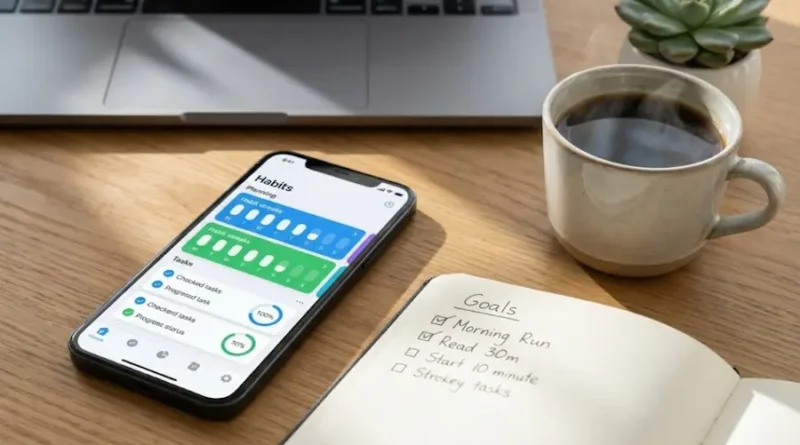
Seeing your progress matters more than you think. Plangud shows you streaks, completion rates, and milestone achievements through colorful charts and progress bars.
It’s satisfying in a way that plain text lists never are. You want to keep those streaks going.
Flexible Dashboard
Your dashboard shows what matters to you most. Pin your priority tasks at the top. See your weekly goals at a glance. Check your habit streaks with one tap.
You’re in control of what you see first when you open the app.
Cross-Device Syncing
Start planning on your laptop. Check tasks on your phone. Update goals on your tablet. Everything syncs in real-time across all your devices.
Your plans follow you wherever you go.
Template Library
Don’t want to start from scratch? Plangud offers pre-built templates for:
- Daily planning routines
- Weekly review systems
- Project management workflows
- Goal-setting frameworks
Pick one, customize it to fit your life, and you’re ready to go in minutes.
Integration with Other Tools
Plangud plays well with the apps you already use. It connects with Google Calendar, Outlook, Slack, and more.
Your scheduled meetings appear alongside your personal tasks. Your team messages link to relevant projects. Everything flows together naturally.
Who Benefits Most from Using Plangud?
Plangud isn’t for everyone. But if you fall into one of these groups, it might be just what you need.
Students Juggling Multiple Responsibilities
Between classes, assignments, exams, clubs, and social life, student schedules are chaos. Plangud helps you:
- Track assignment deadlines across multiple courses
- Build study habits that stick
- Balance schoolwork with personal goals
- See what needs attention today vs. next week
One student shared that Plangud helped her go from constant stress to feeling actually prepared for exams.
Professionals Managing Career and Personal Life
You’ve got work projects, side hustles, fitness goals, and family time to balance. Plangud gives you:
- A clear view of what matters most each day
- Habit tracking for health and learning goals
- Progress visibility on long-term career objectives
- One system instead of five different apps
It’s about working smarter, not just harder.
Entrepreneurs and Freelancers Running Multiple Projects
When you’re your own boss, organization becomes survival. Plangud helps you:
- Prioritize client work without dropping personal goals
- Track multiple project timelines in one place
- Build business-building habits consistently
- See which areas need more attention
One freelance designer said Plangud helped him stop feeling scattered and start feeling focused.
Anyone Recovering from Burnout
If you’re tired of productivity systems that make you feel worse about yourself, Plangud’s gentle approach might be exactly what you need right now.
It doesn’t judge you for incomplete tasks. It doesn’t pressure you with aggressive notifications. It simply helps you take small steps forward, one day at a time.
Your First 15 Minutes with Plangud
Curious but not sure where to start? This is what to do when you first download Plangud:
Step 1: Name Your Core Life Areas (3 minutes)
Pick the five main categories of your life. Keep it simple:
- Work
- Health
- Learning
- Home
- Relationships
These become your organizing framework for everything else.
Step 2: Add Your Recurring Tasks (5 minutes)
Think about things you do regularly:
- “Plan tomorrow’s tasks”
- “Weekly grocery shopping”
- “Water the plants”
- “Review budget”
These form the foundation of your daily rhythm.
Step 3: Define Your Key Habits (4 minutes)
What do you want to build consistency around?
- “Read for 20 minutes”
- “Exercise 3 times per week”
- “Meditate daily”
- “Practice guitar”
Link these to specific tasks so progress tracks automatically.
Step 4: Set Your First Goal (3 minutes)
Pick one thing you want to achieve in the next 30 days. Make it specific:
- “Complete online course”
- “Finish first draft of book chapter”
- “Run 5K without stopping”
Break it into smaller milestones right inside Plangud.
That’s it. In 15 minutes, you’ve got a working system. Now you just use it daily and watch your consistency build.
Plangud vs. Other Planning Tools: An Honest Comparison
How does Plangud stack up against other popular apps?
Plangud vs. Notion
Notion is incredibly powerful but requires serious setup time. You need to build your own systems from scratch.
Plangud gives you structure out of the box. It’s less flexible but way easier to start using immediately.
Choose Plangud if: You want to start planning today, not next week. Choose Notion if: You love customizing systems and don’t mind the learning curve.
Plangud vs. Todoist
Todoist is excellent for task management. But habit tracking feels like an afterthought.
Plangud integrates tasks and habits naturally from day one. The connection between daily actions and long-term goals feels smooth and effortless.
Choose Plangud if: Building habits is as important as completing tasks. Choose Todoist if: You only need a powerful to-do list without habit features.
Plangud vs. Habitica
Habitica gamifies everything, turning life into an RPG game. It’s fun but can feel gimmicky.
Plangud uses progress tracking for motivation but stays focused on genuine results, not game points.
Choose Plangud if: You want genuine progress, not just game rewards. Choose Habitica if: Gamification genuinely motivates you long-term.
Plangud vs. ClickUp
ClickUp is a powerhouse for team project management. But it’s overwhelming for personal planning.
Plangud keeps things simple and focused on individuals or small groups who want clarity, not complexity.
Choose Plangud if: You need personal planning, not enterprise project management. Choose ClickUp if: You’re managing large teams with complex workflows.
What Real Users Experience After Using Plangud
Features are nice. But what changes in people’s lives?
Based on user reviews and testimonials, here’s what happens:
Week 1: The Clarity Phase
People report feeling less scattered. Instead of wondering “What should I do first?” they know what needs attention today.
One user said: “For the first time in months, I’m not starting my day in panic mode.”
Week 2-3: The Momentum Phase
Small wins start stacking up. Habit streaks reach 7 days, then 10, then 14. Tasks get completed consistently.
The visual progress becomes addictive in a healthy way. You don’t want to break your streak.
Month 1+: The Transformation Phase
People notice they’re finishing projects they started. Long-term goals don’t feel overwhelming anymore because they’re broken into daily actions.
Many report better work-life balance because they’re planning both career and personal goals in one system.
A professional shared: “I used to work late constantly because I felt behind. Now I finish on time because I’m focused on what actually matters.”
Common Mistakes to Avoid When Starting with Plangud
Want to get the most from Plangud? Don’t make these beginner mistakes:
Mistake #1: Adding Too Much at Once
Resist the urge to plan your entire life on day one. Start with 3-5 tasks and 2-3 habits. Add more as you build the daily check-in routine.
Mistake #2: Setting Unrealistic Daily Goals
Be honest about your capacity. It’s better to complete 5 tasks daily than to constantly fail at 20.
Mistake #3: Ignoring the Review Feature
Plangud works best when you review weekly. Spend 10 minutes every Sunday adjusting what’s working and what’s not.
Mistake #4: Not Linking Tasks to Habits
This is Plangud’s superpower. Don’t just create standalone tasks. Connect them to habits so progress compounds.
Mistake #5: Forgetting to Celebrate Wins
Plangud tracks milestones. Pause and acknowledge when you hit them. Motivation comes from recognizing progress.
What Plangud Won’t Do (Important to Know)
Let’s be real about limitations. Plangud is excellent for individual planning, but it’s not designed for:
Complex Team Project Management: If you’re coordinating 20 people across multiple departments, you need something like Asana or Monday.com.
Advanced Financial Tracking: It helps you plan “Review budget” as a task, but it won’t calculate your expenses.
Detailed Time Tracking: It tracks habits and tasks, but not minute-by-minute time logs like Toggl.
Replacing All Your Tools: Some people expect one app to do everything. Plangud focuses on planning, not replacing your email, calendar, or communication tools entirely.
If you’re interested in learning more about effective time management strategies, combining Plangud with other specialized tools can create a powerful productivity system.
Knowing these limits upfront helps you use Plangud for what it does best: helping you plan, track, and achieve personal goals consistently.
Is Plangud Free? Pricing and Plans Explained
Most productivity apps follow a freemium model, and Plangud is no exception.
Free Plan: The basic version includes core features like task management, habit tracking, and goal setting. For most people starting out, this is enough.
Premium Plan: Extra features like unlimited integrations, detailed analytics, and team collaboration tools require a paid subscription. Pricing varies, so check their official website for current rates.
The 3-Day Test: My advice? Use the free version for three days. If you’re consistently opening it and finding value, consider upgrading. If not, it’s probably not the right fit right now, and that’s okay.
Final Thoughts
After everything we’ve covered, the simple truth is:
Plangud works if you’re tired of complicated systems and want something that just helps you get things done.
It’s perfect for people who:
- Feel scattered across multiple apps
- Start strong but struggle to maintain consistency
- Want to see progress visually, not just feel it
- Need gentle guidance, not aggressive pressure
- Value simplicity over endless features
It might not be ideal if you:
- Need complex team project management
- Prefer paper planning exclusively
- Want every possible feature imaginable
- Are happy with your current system
The best way to know? Try it yourself.
Download Plangud, follow the 15-minute setup guide from earlier, and use it for just three days. That’s enough time to feel whether it clicks with how your brain works.
Planning shouldn’t be another thing that stresses you out. It should be the tool that helps you feel more in control, more focused, and more capable of achieving what matters to you.
If that sounds like what you need right now, Plangud might just be your answer.
Ready to stop planning and start doing? Give Plangud a try and see what changes in your first week. Sometimes the simplest solution really is the best one.