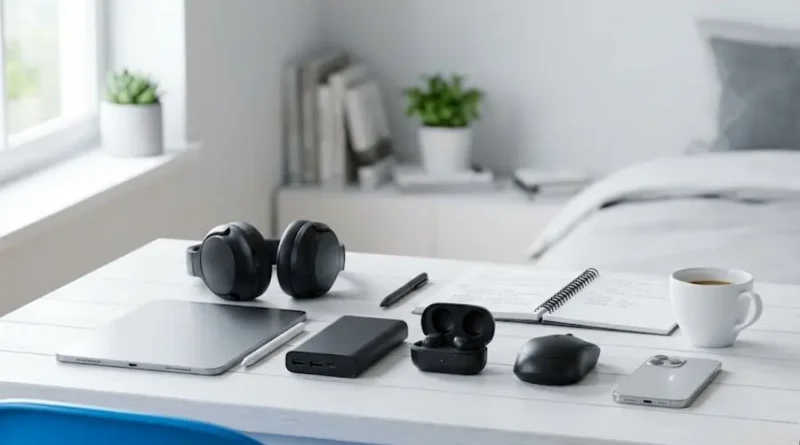
Latest Gadgets for Students: Which Ones Are Really Worth Your Money?
Being a student in 2026 is tough. You’re juggling classes, assignments, projects, and maybe even a part-time job. Your phone dies right before an important class. Your notes are a mess. And that library noise? It’s driving you crazy.
The right gadgets can change everything.
But you don’t need expensive, fancy tech that costs more than your monthly food budget. You need smart, affordable gadgets that solve real problems.
After researching what thousands of students are buying and loving right now, I’ve put together this list. These aren’t random picks. These are the gadgets that students say they can’t live without.
Why These Gadgets Matter (More Than You Think)
Your professors aren’t going to wait for your laptop to charge. Your study group won’t reschedule because you lost your notes. And that deadline? It doesn’t care if your gadgets failed you.
Modern students need portable devices with AI features that help them access interactive lessons, virtual tutors, and cloud-based notes anywhere. The old “notebook and pen” days are gone. Today’s education happens across multiple screens, apps, and platforms.
The good news? Technology has never been more affordable. You can build an amazing tech setup without selling your textbooks.
10 Gadgets Every Student Needs Right Now
1. Noise-Canceling Headphones: Your Focus Superpower
Picture this: You’re in a crowded library. People are talking. Chairs are scraping. Your brain can’t focus. Then you put on noise-canceling headphones. Suddenly, it’s just you and your work.
Why students love them:
- Block out roommate noise, library chatter, and dorm parties
- Perfect for online classes and video calls
- Help you focus during study sessions
- Great for listening to music or podcasts while commuting
What to buy:
- Sony WH-1000XM6 (Premium option, around $230) – Best in class
- Anker Soundcore Space Q45 (Budget-friendly, around $100) – Amazing value
- PowerLocus Bluetooth Headphones (Budget option, under $50) – Great for beginners
Real student review: “These headphones saved my grades. I can actually focus now, even when my roommate is watching TV.”
2. Portable Power Bank: Never Run Out of Battery Again
Your phone battery hits 5% during class. Your laptop dies before you finish your essay. Sound familiar?
A power bank from Anker can hold enough power for around two full charges of an iPhone. That’s the difference between missing an important email and staying connected all day.
What to look for:
- At least 10,000mAh capacity (charges most phones twice)
- Fast charging support
- Lightweight and portable design
- Multiple ports for charging several devices
Best options:
- Anker PowerCore 10,000 (Under $30) – Student favorite
- Anker 737 Power Bank (Around $100) – Premium with laptop charging
Tip: Keep it charged in your bag. You never know when you’ll need it.
3. Smart Notebook: Write by Hand, Store in the Cloud
Love writing notes by hand but hate losing them? Welcome to the future.
Smart notebooks let you write normally, then scan and save your notes digitally. Digital note-taking tools are booming, with searches up 50% as students go paperless.
How it works:
- Write in the notebook with the special pen
- Scan pages with your phone
- Notes automatically save to Google Drive or Dropbox
- Erase and reuse the pages
Popular choices:
- Rocketbook (Around $30) – Reusable and eco-friendly
- reMarkable 2 (Around $400) – Premium tablet that feels like paper
Why it’s genius: No more stacks of notebooks. Everything is organized and searchable on your phone.
4. Wireless Earbuds: For When You’re on the Move
Headphones are great for long study sessions. But for quick classes, gym time, or walking to campus? Wireless earbuds are your best friend.
What makes them perfect:
- Tiny and easy to carry
- No wires getting tangled
- Good enough sound for lectures and music
- Some have noise cancellation
Budget-friendly picks:
- EarFun Air Pro 3 (Under $60) – Great value with noise canceling
- Anker Soundcore Life P3 (Around $80) – Excellent for the price
Student hack: Use one earbud during boring lectures so you can still hear if someone talks to you.
5. Tablet: Your All-in-One Study Tool
Think tablets are for watching Netflix? Think again. Modern tablets are powerful enough to replace your laptop for most tasks.
Why students are switching to tablets:
- Take notes with a stylus (feels like real paper)
- Lighter than laptops
- Better battery life
- Perfect for reading textbooks and PDFs
- Draw diagrams for science classes
What to buy:
- iPad Air with Apple Pencil (From $600) – Best for iOS users
- Samsung Galaxy Tab S10 FE+ (Around $500) – Great Android option with S Pen included
- Amazon Fire HD 10 (Under $150) – Budget-friendly for basic tasks
Good to know: Most devices last 8-12 hours on a single charge, perfect for full school days.
6. Laptop Cooling Pad: Save Your Laptop’s Life
Ever put your laptop on your bed and felt it get super hot? That’s bad. Really bad.
Overheating can slow down your laptop and even damage it permanently. A cooling pad solves this problem.
Benefits:
- Keeps your laptop cool during long study sessions
- Fans are quieter than your laptop’s fans
- Works as a stand for better posture
- Extra USB ports for connecting more devices
Affordable option:
- Basic laptop cooling pad (Around $20-40)
Warning: Never use your laptop directly on soft surfaces like beds or couches without a cooling pad.
7. External Hard Drive or Cloud Storage: Protect Your Work
Imagine this nightmare: Your laptop crashes the night before your big presentation. All your files are gone. Months of work. Lost forever.
Don’t let this happen to you.
Two backup options:
Option A: External Hard Drive
- Western Digital 1TB (Around $50)
- Stores everything physically
- No internet needed
Option B: Cloud Storage
- Google Drive (Free 15GB, $2/month for 100GB)
- Microsoft OneDrive (Free with student email)
- Access files from anywhere
- Automatic backup
Best move: Use both. Cloud for important files you need everywhere. Hard drive for everything else.
8. Wireless Mouse: Your Wrist Will Thank You
Using a laptop trackpad for hours hurts. Your hand cramps. Your wrist aches. You make mistakes.
A wireless mouse fixes everything.
What students need:
- Comfortable design
- Works on any surface
- Good battery life
- Portable size
Best value:
- Logitech MX Anywhere 3 (Around $80) – Premium feel
- Logitech M510 (Around $25) – Budget-friendly and reliable
Quick tip: If you’re using your laptop a lot, a mouse isn’t optional. It’s essential.
9. Bluetooth Keyboard: Turn Your Tablet Into a Laptop
Got a tablet? Add a Bluetooth keyboard and boom—you’ve got a portable laptop.
Why it’s helpful:
- Type faster than on a touchscreen
- Connect to phone, tablet, or even your TV
- Small enough to fit in your bag
- Long battery life
Good choice:
- Logitech K380 (Around $40) – Connects to 3 devices, switches instantly
Perfect for: Writing long essays, taking notes in class, or working at coffee shops.
10. Password Manager: Stop Forgetting Passwords
School accounts. Email. Online textbooks. Streaming services. Social media.
How many passwords do you have? 20? 30? 50?
Students have a ton of passwords to keep track of for school accounts and personal ones. Trying to remember them all is impossible.
The solution: Password Manager
How it works:
- Saves all your passwords in one secure place
- You only remember ONE password
- Automatically fills in login info
- Creates strong passwords for you
- Works on all your devices
Good option:
- 1Password (Around $36/year for students)
Life-changing benefit: Never get locked out of important accounts again. No more password reset emails.
Budget Breakdown: What Should You Buy First?
Most students can’t buy everything at once. Here’s how to prioritize based on your budget.
Under $100 Budget (Start Here)
- Portable power bank ($25-30) – Never have a dead phone
- Wireless mouse ($20-40) – Save your wrist
- Earbuds or budget headphones ($30-50) – For daily use
Total: Around $75-120
$100-$300 Budget (Level Up)
Add these after the basics:
- Better noise-canceling headphones ($100-150) – Changes how you study
- Smart notebook ($30-40) – Organize your notes
- Bluetooth keyboard ($40) – Work anywhere
- External hard drive ($50) – Backup your work
Total: Around $220-280
$300+ Budget (Full Setup)
If you can save up, these make the biggest difference:
- Tablet with stylus ($400-600) – Replace multiple gadgets
- Premium headphones ($200-250) – Best noise canceling
- Everything from the levels above
Better approach: Buy one gadget per month instead of everything at once. Spread out the cost.
How to Choose the Right Gadgets for YOU
Not all students need the same things. Here’s how to decide what’s worth your money.
Ask yourself these questions:
1. What’s your biggest problem?
- Can’t focus? → Get noise-canceling headphones
- Phone always dies? → Get a power bank
- Losing notes? → Get a smart notebook or tablet
- Slow laptop? → Get external storage and cloud backup
2. Where do you study most?
- Noisy dorm or library? → Headphones are essential
- Coffee shops? → Get a portable mouse and keyboard
- Always on the move? → Prioritize lightweight, battery-powered gadgets
3. What’s your major?
- Art/Design students: Tablet with stylus is a must
- Engineering/Computer Science: Good laptop, extra storage, backup power
- Liberal Arts/Business: Basic setup works fine, focus on organization tools
- STEM students: Calculator, tablet for diagrams, noise-canceling headphones
4. What’s your budget?
- Tight budget: Power bank + earbuds + mouse = $75
- Moderate budget: Add headphones + smart notebook = $200
- Comfortable budget: Get a tablet + premium headphones = $600+
Shopping Tips to Save Money
Want these gadgets without going broke? Use these strategies.
1. Wait for Sales
- Back-to-school sales (July-August) – Huge discounts
- Black Friday/Cyber Monday (November) – Up to 50% off
- Amazon Prime Day (July) – Great tech deals
- Student discounts – Many brands offer 10-20% off with student email
2. Buy Refurbished
Many stores sell “renewed” or “refurbished” gadgets that work like new but cost 30-40% less. Amazon Renewed and Best Buy have good options.
3. Check Student Discount Programs
- Apple Education Pricing – Save on iPads and MacBooks
- Microsoft Store – Student discounts on Surface devices
- Spotify Premium – Includes Hulu for $6/month
- Amazon Prime Student – Half price with free shipping
4. Sell Your Old Stuff
Got an old phone or tablet you don’t use? Sell it on Facebook Marketplace or trade it in. Use that money for new gadgets.
5. Consider Cheaper Alternatives
- Don’t need the latest iPhone? Last year’s model works great and costs less
- Brand-name too expensive? Try budget brands like Anker (they’re actually really good)
- New tablet too pricey? Get a gently used one from a trusted seller
Common Mistakes to Avoid
Learn from what other students wish they knew.
Mistake 1: Buying Everything at Once
The problem: You spend $1,000 in one day and regret it. Better way: Start with basics. Add gadgets as you figure out what you actually need.
Mistake 2: Choosing Style Over Function
The problem: You buy the prettiest gadget, but it doesn’t do what you need. Better way: Read reviews. Watch YouTube videos. Make sure it solves your actual problem.
Mistake 3: Ignoring Battery Life
The problem: Your wireless headphones die after 3 hours. Annoying! Better way: Always check battery life in reviews. Aim for at least 20+ hours for headphones.
Mistake 4: No Backup Plan
The problem: Your laptop crashes and you lose everything. Better way: Set up automatic cloud backup from day one. It’s free with most student emails.
Mistake 5: Buying Too Cheap
The problem: Your $10 earbuds break in two weeks. Better way: It’s okay to spend a little more for quality. A $40 item that lasts 2 years beats a $10 item that breaks in a month.
Taking Care of Your Gadgets
Make your tech last longer with these simple habits.
Daily habits:
- Clean your screens weekly – Use a microfiber cloth (don’t use your shirt!)
- Charge carefully – Don’t let battery drop to 0% all the time
- Use cases – Protect phones and tablets from drops
- Keep away from water – Even “water-resistant” isn’t “waterproof”
Monthly maintenance:
- Clear storage – Delete old photos and files you don’t need
- Update software – Keep everything running smoothly
- Check for damage – Fix small problems before they become big ones
- Clean ports – Dust and lint can block charging
Storage tips:
- Never leave in hot cars – Heat damages batteries
- Store in dry places – Moisture can ruin electronics
- Use surge protectors – Power surges can fry your devices
- Keep chargers organized – Tangled cables wear out faster
What Actually Matters
You don’t need all the latest gadgets. You need the RIGHT gadgets that solve YOUR problems.
Start with the basics:
- A way to stay charged (power bank)
- A way to focus (headphones or earbuds)
- A way to work comfortably (mouse, maybe keyboard)
- A way to backup your work (cloud storage)
Everything else? Add it when you can afford it and when you know you’ll use it.
The best gadget isn’t the most expensive one. It’s the one you actually use every single day.
Your Next Step
Pick ONE gadget from this list that would solve your biggest current problem. Just one.
Buy it (or add it to your wishlist for your next birthday).
Use it for a month.
Then decide what to add next.
That’s how you build a tech setup without breaking the bank.
Quick question: What’s the one gadget you wish you had right now? The one that would make your student life so much easier?
Think about it. That’s where you should start.
Good luck with your studies!
Visit the rest of our site for more tech updates.